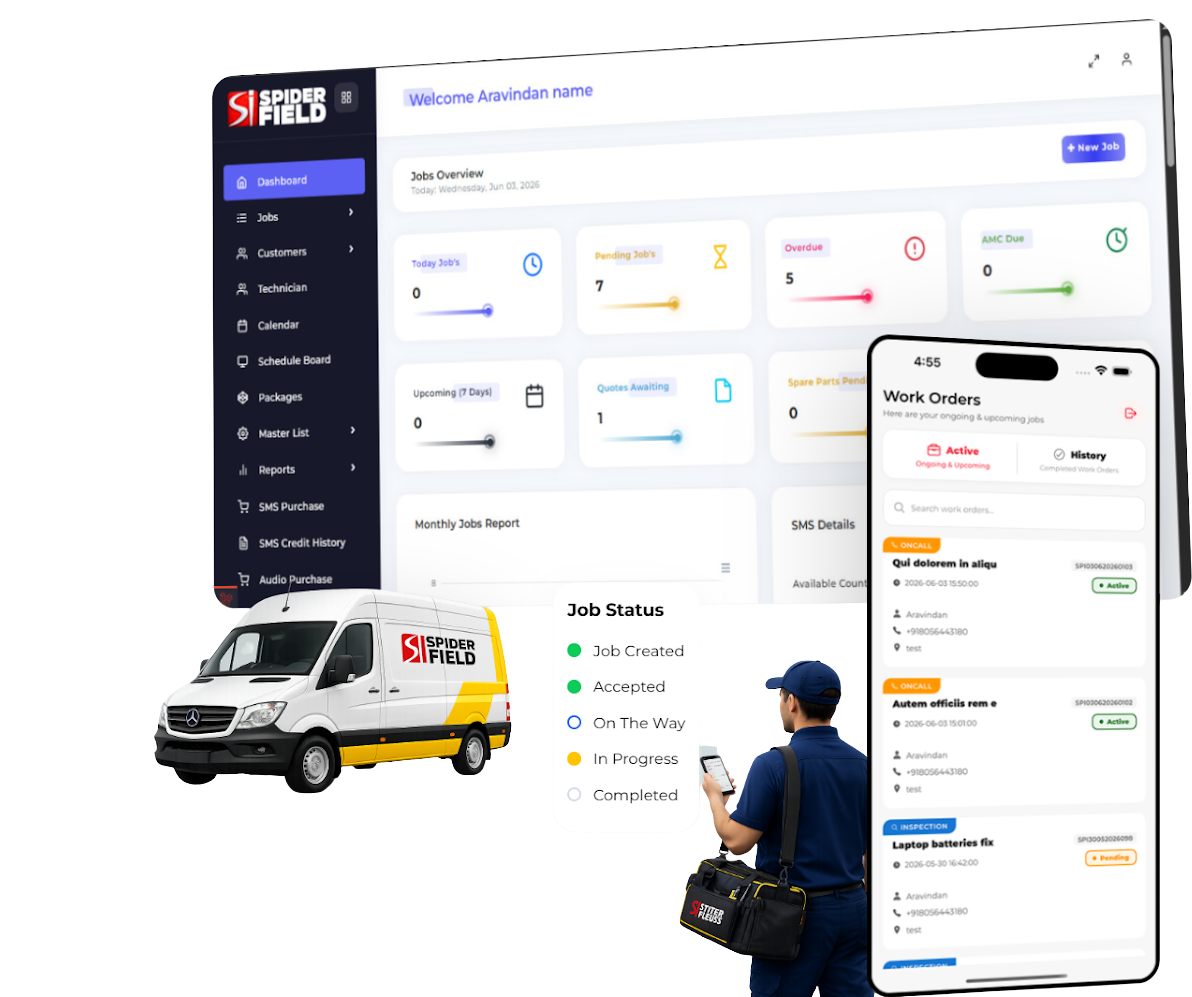
SMART FIELD SERVICE MANAGEMENT

Manage Jobs.
Empower Technicians.
Delight Customers.

All your field service operations in one powerful platform. Track, manage and grow your business with ease.

Dashboard & Reports
Live Technician Tracking
Job Management
Inventory Management
Customer Communication
SpiderFIELD
Boost Productivity
Save Time
Improve Accuracy
Reduce Costs
Grow Revenue
Full Lifecycle Coverage

Booking a Job Is the Easy Part

Plenty of tools will answer your phone and fill a slot on the calendar. Very few can prove the work was done, get the variation approved on site, record the parts consumed, and protect the contract at renewal. SpiderFIELD covers all six stages of the service lifecycle.

1 · Capture
the request
2 · Schedule
& dispatch
3 · Execute
the work
4 · Prove
& sign off
5 · Quote
& upsell
6 · Retain
the contract
SpiderFIELD Field service platform
Portal, web form, AI intake
Assign, notify, SLA
AI instructions, findings
Video, chop, e-sign
On-site quote + code
AMC auto-scheduling
AI answering services Call handling tools
Phone booking
Hands off to your CRM
Not covered
Not covered
Not covered
Not covered
Spreadsheets & WhatsApp How most teams run today
Scattered
Manual
Unstructured
Photos in a chat
Days later
Missed renewals

Stage 1 alone does not grow a service business. Stages 3 to 6 are where margin, repeat revenue and customer trust are actually won — and that is the ground SpiderFIELD is built on.

Why SpiderFIELD

Replace WhatsApp Chaos With a Complete Service Workflow

Every job traceable end to end — who raised it, who was assigned, what was checked,
what was found, what was replaced, what the customer approved and what was reported back.

Common Service Problems

× Requests arrive after hours and sit unanswered until morning.
× Jobs scattered across calls, WhatsApp, spreadsheets and paper forms.
× Every technician works to a different standard and writes different notes.
× Disputed work with no dated evidence and no signed acceptance.
× Additional work spotted on site is quoted days later — or never.
× Missed contract visits and renewals that quietly lapse.

SpiderFIELD Outcomes

Customers raise jobs themselves, day or night, from your own website.
One structured workflow with live technician location and job duration.
AI job instructions technicians tick off before, during and after the work.
Before and after video, customer chop and dual signatures on every job.
Technicians quote on the spot and close approval with a secure code.
Contracts auto-generate their own service jobs and renewal alerts.
Round-the-Clock Job Capture

Your Website Becomes Your After-Hours Service Desk

No call centre, no per-minute charges, no third party between you and your customer. Embed the SpiderFIELD job request form into the website or portal you already own, and let customers raise their own jobs at 2 AM — with AI turning their plain-language complaint into a structured, dispatch-ready work order.

1
Embeddable Job Request Form

Drop the request form into your existing website, customer portal or intranet. Your branding, your domain, your logo — no redirect to a third-party page.

2
AI-Assisted Job Generation by the Customer

The customer types the problem in their own words. AI structures it into a proper job description with service context, likely category and expected scope — so your dispatcher receives a usable work order, not a one-line complaint.

3
After-Hours Capture, No Night Shift

Requests raised outside working hours land in the system immediately, timestamped and queued. Nothing waits on a voicemail box or a WhatsApp message someone reads the next morning.

4
Client Portal Login

Give contract customers their own login to raise jobs, view every open request and pull their full service history whenever they need it.

5
Live Job Status Until Closed

Customers follow their job from received to assigned, in progress, awaiting approval, completed and closed — which removes the "any update?" phone calls entirely.

6
Technicians Raise Jobs From the App

A technician who spots additional work on site creates the job then and there, without calling the office. Capture is not limited to the customer.

yourcompany.com / service-request 02:14 AM

Raise a Service Request

Submitted by ABC Manufacturing · Site 2

SITE / ASSET Chiller Unit 3 — Roof Deck
DESCRIBE THE PROBLEM "aircon in server room not cooling since evening, making loud noise, water dripping near the unit"
✦ AI-GENERATED JOB DESCRIPTION

Cooling failure on server room HVAC unit with abnormal operating noise and condensate leakage. Inspect refrigerant charge, compressor operation, drain line blockage and filter condition. Critical-area asset — prioritise response.

CATEGORY HVAC · Breakdown
PRIORITY Critical
CONTRACT SC-2026-0218
SLA RESPONSE 4 Hours
Core Capabilities

Everything Your Field Team Needs, In One Place

Twenty-plus capabilities, grouped by the part of the job they serve. Enable only what your team needs today and switch on the rest as your operation matures.

A

Job Intake & Assignment

Advanced Job Creation

Categories and sub-categories, service details, customer and site data, latitude/longitude, address, attachments and job-specific notes.

Customer-Created Jobs

Customers raise their own jobs from the client portal or the job request form embedded on your website — around the clock.

Assignment & Live Tracking

Assign technicians, monitor progress, capture job duration and track technician location throughout the field visit.

B

AI Job Intelligence

AI Job Descriptions

Turn a short customer complaint — typed by your office or by the customer themselves — into a structured, dispatch-ready job description.

AI Job Instructions

Generate before, during and after task instructions from the job description, asset type and work category. Technicians tick each one off in the app.

AI Completion Summaries

Convert selected findings and raw field notes into a clean, professional summary the customer can actually read.

C

Inspections & Technician Workflow

Digital Inspections

Configurable inspection forms and branded inspection reports for audits, statutory checks and pre-contract surveys.

Convert Inspection to Job

Turn a failed inspection point straight into a scheduled job — capturing remedial revenue you are already standing next to.

Technician Findings Master

Technicians select findings from a master library you maintain in the backend, so field reporting is standardised instead of freehand.

D

Evidence, Sign-Off & Quotations

Photo & Video Evidence

Upload before and after photographs and video against the job — the level of proof that ends disputes before they start.

Dual Sign-Off & Company Chop

Capture the customer's signature with their company chop or stamp, plus the technician's own signature and completion notes.

On-Site Quotations

Technicians raise a quotation at the site and the customer approves it securely with an approval code — minutes, not days.

E

Parts, Reporting & Control

Inventory Check & Parts Used

Technicians verify stock before raising a spare parts request, and every part consumed is recorded against the job and the contract.

White-Labelled Auto Reports

Branded PDF job reports with your logo and colours on reports and job request forms, sent automatically on completion — or switched off entirely.

Admin Feature Controls

Enable or disable most features from the admin panel. Keep the technician screen deliberately simple, or run the full sophisticated workflow.

Guided Execution

Every Technician Works Like Your Best Technician

Consistency is the hardest problem in field service. SpiderFIELD does not measure it after the fact — it builds the standard into the job itself, with instructions the technician acknowledges step by step and findings drawn from a library you control.

1 Standard job-specific instructions. Define the before, during and after steps for each job type once. Every technician then follows the same sequence, every time.
2 AI writes the checklist for you. Instructions are generated from the job description, asset and work type — so a new job type does not need an afternoon of admin before it can be dispatched.
3 The technician clicks each step. Acknowledgement is captured in the app, giving you a timestamped record that safety and quality steps were actually performed.
4 Findings come from your master list. Customise the library in the backend so field reporting is consistent, searchable and useful for reliability analysis.
5 Completion notes close the loop. The technician adds context in their own words, and AI turns it into a customer-ready summary.
SF-2026-1008 · Chiller Unit 3 AI GENERATED
BEFORE STARTING
Confirm site access and isolate power supply
Photograph asset nameplate and installation area
Verify PPE and confirm safe working zone
DURING THE JOB
Check refrigerant pressure and compressor operation
Inspect condensate drain line for blockage
Clean or replace filter as required
AFTER COMPLETION
Record findings from master list
Capture after video and customer sign-off
Proof of Work

Evidence Your Customer Cannot Argue With

A photograph proves something existed. A before-and-after video, a timestamped duration, a GPS-verified location, a technician signature and a customer's company chop prove the work was done, accepted and closed — the difference between an invoice that gets paid and one that gets queried.

Job Completion Record DURATION 2H 14M
BEFORE · VIDEO
▶ 00:38
AFTER · VIDEO
▶ 00:52
TECHNICIAN SIGNATURE R. Kumar
CUSTOMER SIGNATURE Lim S.W.
COMPANY CHOP / STAMP
ABC MANUFACTURING SDN BHD
Before and after video alongside photographs — far harder to dispute than a still image in a chat thread.
Customer signature with company chop or stamp — the sign-off your finance team actually needs for payment in Malaysian, Indian and wider Asian markets.
Technician signature and completion notes attached to the same record, so accountability runs both ways.
Job duration and technician location captured automatically — no manual timesheets, no argument about attendance.
Spare parts consumed recorded against the job and the contract, so you can see which assets and which agreements are eroding your margin.
Branded PDF issued automatically the moment the job closes — or held back, if your process prefers a manual review first.
Industries We Serve

Built for Contract-Based Service Operations

Categories, inspections, findings, job instructions and reports are all configurable — so the same platform fits a chiller maintenance contractor, a biomedical service team and a data centre support desk without customisation work.

End-to-End Workflow

From After-Hours Request to Closed, Signed and Reported

Eight connected stages. Every one of them recorded, timestamped and reportable.

1

Request Captured 24/7

Website form, client portal, office or technician — AI structures the description.

2

Assign & Schedule

Technician assigned, customer notified, SLA clock started.

3

Instructions Followed

AI or standard before/during/after field2-worksteps ticked off in the app.

4

Inspection & Findings

Inspection completed, findings selected from your master library.

5

Parts & Inventory

Stock checked, parts requested and consumption recorded.

6

Quote & Approval Code

Additional work quoted on site and approved securely by the customer.

7

Evidence & Sign-Off

Before/after video, customer chop, dual signatures, completion notes.

8

Report Auto-Sent

Branded PDF generated and emailed; customer tracks closure in the portal.

Service Contracts & AMC

The Revenue Answering Services Cannot Touch

Recurring maintenance is where service businesses make their margin, and it is won at renewal — not on the phone. Use the terminology that fits your market: AMC, Service Contract, Maintenance Agreement or Preventive Maintenance Agreement.

Service Contract SC-2026-0218

ABC Manufacturing · Comprehensive Preventive Maintenance

CONTRACT PERIOD Jan–Dec 2026
ASSETS COVERED 16 Assets
SERVICE FREQUENCY Quarterly
NEXT VISIT 15 Sep 2026
RESPONSE SLA 4 Hours
RENEWAL 130 Days
Device / Asset Level Contracts

Track make, model, serial number, installation date and full service history.

Auto-Create Scheduled Jobs

Generate service jobs automatically from the maintenance frequency.

Contract Coverage

Configure labour, parts, callouts, scheduled services and exclusions.

Renewal Reminders

Track expiry, renewal status and upcoming contract actions well in advance.

Customer-Specific SLA

Configure response and resolution commitments contract by contract.

Contract Profitability

See parts and labour consumed per contract before you price the renewal.

SpiderFIELD AI

AI Where It Actually Helps — Not Just Where It Demos Well

SpiderFIELD applies AI at three points in the lifecycle: when the customer raises the job, when the technician performs it, and when the report goes back out.

FOR YOUR CUSTOMER

AI Job Generation

Customers describe the problem in plain language on your website or portal; AI produces a structured job description with category, context and scope.

FOR YOUR OFFICE

AI Job Descriptions

Turn a two-line phone complaint into a complete work order without a dispatcher rewriting it by hand.

FOR YOUR TECHNICIAN

AI Job Instructions

Before, during and after task steps generated from the job, asset and work type — then acknowledged one by one in the app.

FOR YOUR CUSTOMER

AI Findings Summary

Selected findings and field notes rewritten into a professional, customer-facing completion summary.

FOR YOUR MANAGERS

AI-Assisted Reporting

Interpret technician activity, repeat failures and service performance across sites and contracts more quickly.

COMING NEXT

AI Voice Assistant

Voice-based job capture and status enquiry, arriving as an optional add-on across all three plans. See the roadmap →

Product Roadmap

Voice Is Coming — On Top of a Platform That Already Runs the Whole Job

Adding voice to a complete field service platform is a feature release. Adding inspections, contracts, evidence capture, quotations and a client portal to a voice product is a rebuild.

AI Voice Job Capture. Customers call and describe the fault; the assistant creates the job directly in SpiderFIELD with the same AI job description your web form already produces.
Voice Status Enquiry. Callers ask about an existing job and hear its live status without occupying a coordinator.
Available on Basic, Pro and Enterprise. Offered as an optional add-on rather than locked behind the top tier.
Already covered today. Until voice ships, after-hours capture runs through your website request form and the client portal — with no per-minute call charges at all.
NEXT RELEASE · ADD-ON

SpiderFIELD Voice

An optional AI voice channel that feeds the same job pipeline as your portal and web form — one job record, one workflow, one report, whichever way the request arrives.

Basic Add-on
Pro Add-on
Enterprise Add-on
Register Interest
Key Benefits

How SpiderField Works

A simple workflow that ensures every service visit is scheduled, proven, approved, and documented.

Customer Booking Received

Service call created with customer details and equipment info.

Assign Engineer + Schedule

Monthly/weekly schedule updates automatically.

Engineer Starts Job with Proof

Start time + site/device photos recorded.

Progress + Parts Requests

Request parts, check inventory, update status live.

Quote Generated & Approved

Email sent with confirmation code for approval.

Job Completed + Customer E-Sign

Completion proof uploaded and signed on-site.

Digital Job Sheet Emailed

Auto-generated report sent instantly with signature.

Seamless Communication Means No Miscommunication

Smart decisions depend on precise, real-time information. SpiderFIELD gives your team better visibility, better communication and stronger operational control.

Access real-time field and service updates from one platform
Coordinate teams and appointments without scattered communication
Keep customer conversations, schedules and quotations organized
Build more confidence with faster and more structured service delivery

All the Features Done Right

SpiderFIELD combines automation, prioritization and visibility to reduce manual work and improve service movement.

Enable Automation Lead creation, team assignment, scheduled activities
AI Lead Scoring Focus on the right priorities first
Reduce Manual Entry Send quotes fast and manage workflows smoothly
Manage Leads Create, acquire, import, nurture and score in one place

Frequently Asked Questions

Common questions from service companies adopting SpiderField.

How does SpiderFIELD capture jobs after working hours? +
On the Enterprise plan you embed a job request form into your own website or portal, and give contract customers a client portal login. Requests raised at any hour are timestamped and queued immediately, and AI converts the customer's plain-language description into a structured job. No call centre and no per-minute charges.
Do you offer AI voice call answering? +
An AI Voice Assistant for job capture and status enquiry is in development and will be released as an optional add-on across Basic, Pro and Enterprise. Today, after-hours capture runs through the website request form and client portal, which feed the same job pipeline the voice channel will use.
What does the customer actually see after they raise a job? +
Through the client portal they follow the job from received to assigned, in progress, awaiting approval, completed and closed, and they can pull their full service history at any time. The branded completion report is emailed automatically unless you disable auto-send.
How do inspections become jobs? +
Complete a digital inspection using your configured form, and convert any failed or flagged point directly into a scheduled job. The inspection report and the resulting job stay linked, which is how remedial revenue gets captured instead of forgotten.
Can technicians create quotations on-site? +
Yes, on Pro and Enterprise. The technician raises the quotation at the site and the customer approves it using a secure approval code, so additional work is authorised in minutes rather than days.
Can SpiderFIELD be configured differently for different service businesses? +
Yes. Categories, sub-categories, findings, inspections, job instructions, reports and most features can be enabled or disabled from the admin panel — so the technician front end stays deliberately simple, or becomes as sophisticated as your operation needs.
What is AMC called outside India? +
SpiderFIELD can use market-appropriate terminology such as Service Contract, Maintenance Agreement, Service & Maintenance Agreement or Preventive Maintenance Agreement. The underlying contract workflow remains the same.
Are WhatsApp and SMS included? +
Email notifications are part of the standard workflow. WhatsApp and SMS are optional usage-based services and require messaging credits.

Ready to See SpiderField in Action?

Get a walkthrough of scheduling, engineer app, proof capture, quotes with approval codes, parts requests and AMC automation.

Pricing

Simple pricing that scales with your service team

Choose a plan based on your number of engineers and the features you need. Upgrade anytime as your operations grow.

MONTHLY YEARLY

ServiceCRM Lite

Digitize your field operations.

$ / User

Field Service Essentials

  • Categories, sub-categories and customer/site information
  • Job start, completion, duration and location tracking
  • Photos, customer & technician signatures, completion notes
  • Spare parts used recorded per job
  • PDF job reports and core email notifications
  • Basic SLA tracking
  • Admin feature controls
  • Job creation, assignment and technician mobile app

ServiceCRM Enterprise Pack

Connect customers, technicians and operations.

$ / User

Connected Service Management

  • Everything in Pro
  • Client Portal login for your customers
  • Customer-created jobs, 24/7 after-hours capture
  • Embeddable job request form for your own website
  • AI-assisted job generation by the customer
  • Live customer job status and full service history
  • Technician-created jobs from the mobile app
  • White-labelled job request forms
  • Advanced SLA, contract and workflow controls

WhatsApp Messaging

Optional credit-based notifications and job detail sharing.

SMS Messaging

Optional SMS credits for transactional alerts.

Additional Storage

Useful for high-volume photo and video evidence.

Custom Integrations

API and enterprise workflow integrations available separately.

Request a Demo

See SpiderFIELD in Action

Get a walkthrough of 24/7 job capture, AI job generation, the technician app, digital inspections, service contracts, on-site quotations, evidence capture, the client portal and automated branded reports.

Designed for HVAC, elevators, electrical, facility management, medical equipment, EV charger, oil & gas maintenance and other service teams.
Enable only the features your team needs — and switch on the rest as you grow.
Scale from simple field jobs to connected enterprise service operations.
Ask us about early access to the AI Voice Assistant add-on.